AClicker
A downloadable tool for Windows
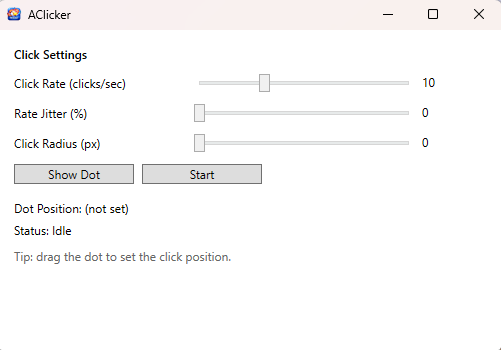
AClicker is a lightweight desktop auto-clicker built for precision and ease of use. Drag the floating target dot anywhere on your screen to set the click location, adjust the click rate, and start or stop instantly with the F6 hotkey.
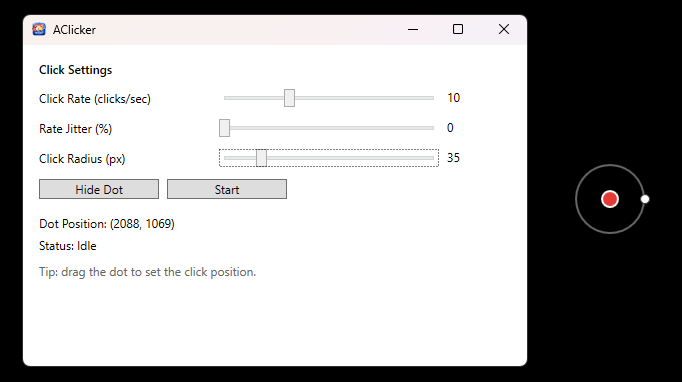
AClicker includes rate jitter and click radius randomization, which add natural variation to click timing and position. A visual overlay shows exactly where clicks will occur, and the dot can be hidden whenever you want a cleaner screen.
Fast, simple, and easy to control, AClicker makes repetitive clicking effortless.
Features
• Movable Click Target
Drag the floating dot anywhere on your screen to define the click location.
• Adjustable Click Rate
Control how fast clicks occur with a clicks-per-second slider.
• Rate Jitter
Optional timing variation adds randomness between clicks.
• Click Radius Randomization
Clicks can occur within a configurable radius around the target point.
• Visual Target Overlay
A floating ring shows exactly where clicks will occur.
• Show / Hide Target Dot
Toggle the overlay marker whenever you want.
• Real-Time Position Display
See the exact screen coordinates of the click location.
• Global Hotkey (F6)
Start or stop clicking instantly from anywhere.
• Simple Start / Stop Controls
Quick activation directly from the interface.
• Lightweight and Fast
Minimal system resources and quick startup.
Download
Install instructions
Install (Windows)
- Download AClicker-Setup-1.0.0.exe.
- Run the installer and follow the prompts.
- If Windows SmartScreen appears, click More info → Run anyway.
- Launch AClicker from the Start Menu (or desktop shortcut if you chose it).
Uninstall
- Windows Settings → Apps → Installed apps → AClicker → Uninstall.
Leave a comment
Log in with itch.io to leave a comment.